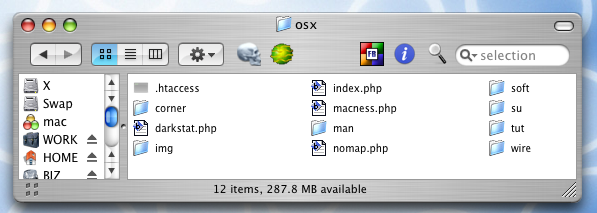
This work in constant progress is some collected wisdom, stuff I've learned on the topic of .htaccess hacking, commands I've used successfully in the past, on a variety of server setups, and in most cases still do. You may have to tweak the examples some to get the desired result, though, and a reliable test server is a powerful ally, preferably one with a very similar setup to your "live" server. Okay, to begin.. .htaccess files are invisible
There's a good reason why you won't see .htaccess files on the web; almost every web server in the world is configured to ignore them, by default. Same goes for most operating systems. Mainly it's the dot "." at the start, you see?
If you don't see, you'll need to disable your operating system's invisible file functions, or use a text editor that allows you to open hidden files, something like bbedit on the Mac platform. On windows, showing invisibles in explorer should allow any text editor to open them, and most decent editors to save them too**. Linux dudes know how to find them without any help from me.
that same folder, as seen from Mac OS X
In both images, the operating system has been instructed to display invisible files. ugly, but necessary sometimes. You will also need to instruct your ftp client to do the same.
By the way; the windows screen cap is more recent than the mac one, moved files are likely being handled by my clever 404 script.
** even notepad can save files beginning with a dot, if you put double-quotes around the name when you save it; i.e.. ".htaccess". You can also use your ftp client to rename files beginning with a dot, even on your local
The practice of blogging, short for keeping a "Web log" or online personal journal, has spread like wildfire -- especially among teenagers, who sometimes maintain blogs without the knowledge of their parents or guardians.
Recent studies show that teenagers write roughly half of all blogs today, with two out of three providing their age, three out of five revealing their location and contact information, and one in five revealing their full name. It should go without saying that there are potential risks in sharing this type of detailed personal information.
And, as more young peers create more blogs, they tend to compete increasingly with each other for attention. Sometimes this can lead to kids posting inappropriate material such as provocative pictures of themselves or their friends.
Establish rules for online use with your kids and be diligent.
Screen what your kids plan to post before they post it. Seemingly innocuous information, such as a school mascot and town photo, could be put together to reveal where the author goes to school.
Ask yourself (and instruct your kids to do the same) if you are you comfortable showing any of the content to a stranger. If in doubt, have them take it out.
Evaluate the blogging service and find out if it offers private, password-protected blogs.
Save the Web address of your child's Blog and review it on a regular basis.
Check out other blogs to find positive examples for your kids to emulate.
Basic guidelines for Bloggers The following tips are a good place to start for kids interested in blogging, although by no means comprehensive. It's a good idea for parents to add more guidelines to suit their family's particular needs. Start by telling kids that they should: READ MORE
Cuil.com is a new search engine launched on July 28, 2008, currently available in English and titles it has larger index compared to other major search engine, today ( on 30-07-2008) it has about Search 121,617,892,992 web pages
Google has launched its Web Browser called Chrome. We search, chat, email and collaborate in a browser. And in our spare time, we shop, bank, read news and keep in touch with friends -- all using a browser. Because we spend so much time online, we began seriously thinking about what kind of browser could exist if we started from scratch and built on the best elements out there.
We realized that the web had evolved from mainly simple text pages to rich, interactive applications and that we needed to completely rethink the browser. What we really needed was not just a browser, but also a modern platform for web pages and applications, and that's what we set out to build.
Google Chrome is Google’s open source browser project. As rumored before under the name of “Google Browser”, this will be based on the existing rendering engine Webkit. Furthermore, it will include Google’s Gears project.
The browser will include a JavaScript Virtual Machine called V8 built from scratch by a team in Denmark, and open-sourced as well so other browsers could include it. One aim of V8 was to speed up JavaScript performance in the browser, as it’s such an important component on the web today. Google also say they’re using a “multi-process design” which they say means “a bit more memory up front” but over time also “less memory bloat.” When web pages or plug-ins do use a lot of memory, you can spot them in Chrome’s task manager, “placing blame where blame belongs.”
Google Chrome will use special Tabs. Instead of traditional tabs like those seen in Firefox, Chrome puts the tab buttons on the upper side of the window, not below the address bar.
Web apps can be launched in their own browser window without address bar and toolbar. Mozilla has a project called Prism that aims to do similar (though doing so may train users into accepting non-URL windows as safe or into ignoring the URL, which could increase the effectiveness of phishing attacks).